Access Controller · IG-4020K-IPW

Every Door and Gate, Under Control

The Ingresso IG-4020K-IPW is an IP-based access controller for one or two doors. It holds up to 40,000 users, alarms when a door is forced or held open, and connects to your other detection systems through its alarm relays. Every controller is deployed, configured and monitored from the Manager Portal.
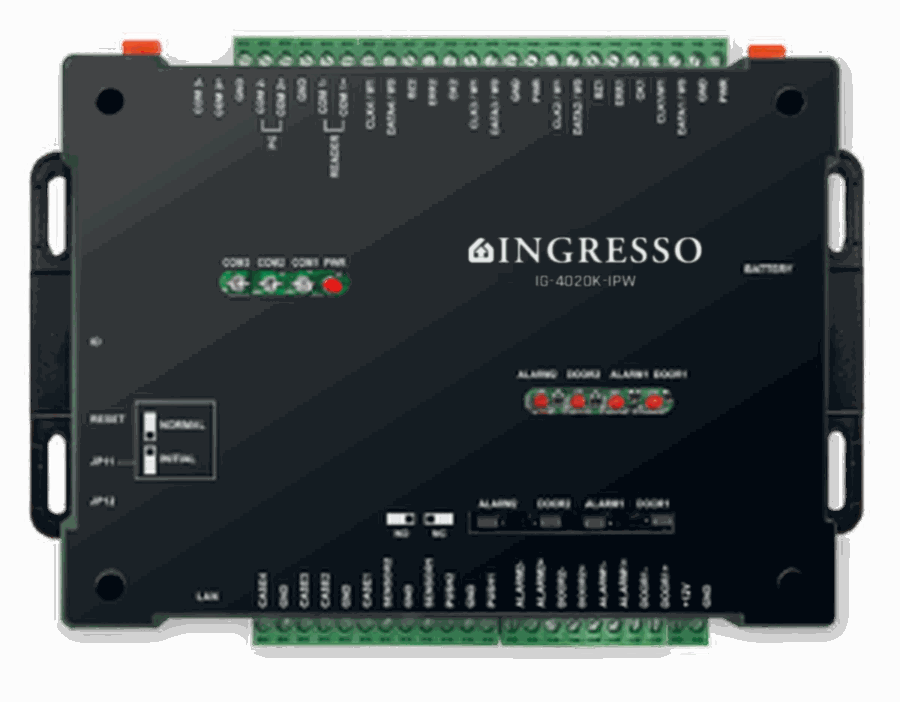
Ingresso IG-4020K-IPW IP access controller

At a Glance

One Controller. One or Two Doors.

1–2

Doors

Run a single door or gate, or two doors from one controller.

40K

Users in One-Door Mode

Up to 40,000 users on a single door.

20K

Users per Door

Up to 20,000 users on each door in two-door mode.

Managed from the Portal

Deploy in Minutes. Manage from Anywhere.

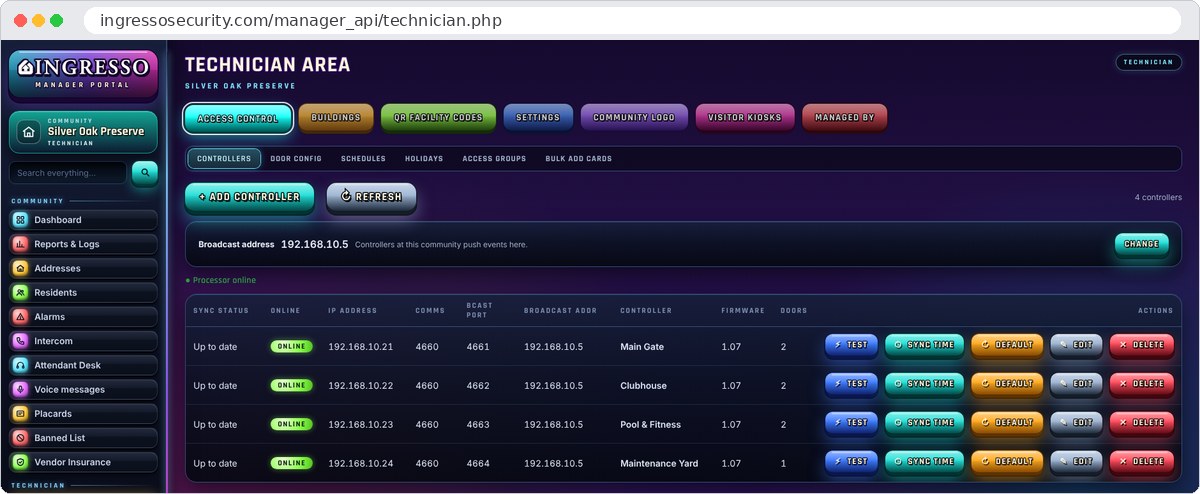
Controllers list in the Ingresso Manager Portal Technician Area showing four online controllers

Technician Area

Quickly Deploy New Controllers

Add a controller from the Technician Area of the Manager Portal, test the connection, and save. Its doors are created and the controller is programmed with its door settings, schedules and credentials automatically.

  • Live online and sync status for every controller
  • Connection test and clock sync with one click
  • Re-program a replacement controller without re-entering a single card
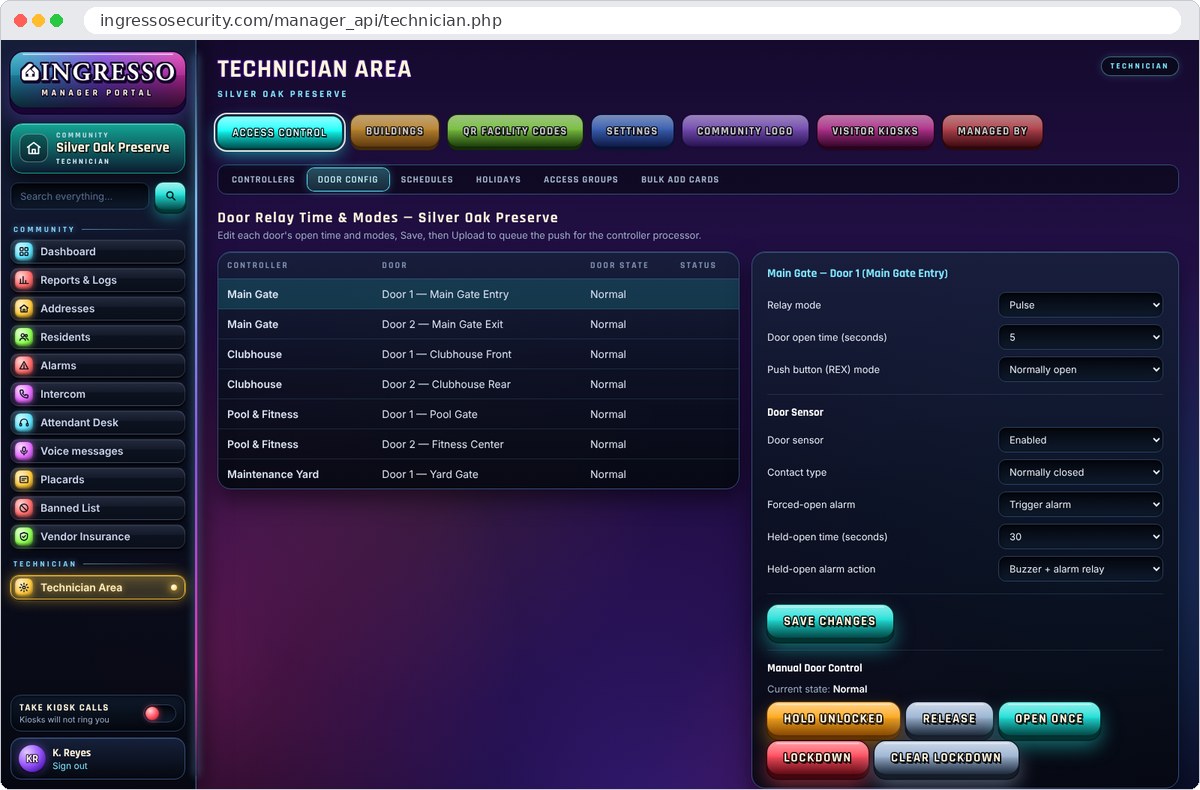
Door relay time, door sensor and alarm settings in the Ingresso Manager Portal

Doors and Alarms

Know the Moment a Door Is Left Open

Each door is set up from the portal: how long it unlocks, how its exit button works, and how it alarms. A forced door or a door held open past its time raises an alarm, and the alarm relay can signal your other detection systems.

  • Forced-open and held-open alarms on every monitored door
  • Buzzer, alarm relay, or both
  • Hold unlocked, open once, or lock down a single door or every door

Features

Built for Every Entrance

Alarm on Door Open

A door sensor on each door reports when it is forced open or held open longer than allowed, and the alarm appears in the Manager Portal.

Alarm Relays

Alarm relay outputs provide an interface to other detection systems, so a door alarm can be passed on to the equipment that already watches your property.

Lockdown

Lock down one door or every door at the property from the portal, and clear the lockdown just as quickly.

Two Readers per Door

Each door accepts two readers: one for entry and one for exit, or a card reader and a vehicle RFID reader in the same lane.

Flexible Door Control

Pulse, latch or toggle relay modes, an adjustable unlock time, and a request-to-exit button input for each door.

Schedules and Holidays

Weekly schedules and holiday calendars decide when each group of people can open each door.

Access Groups

Group people by the doors they need and the hours they need them. Changes reach the controllers automatically.

Cards and QR Codes

Issue access cards and QR codes from each person's record, or add cards in bulk.

Access Log

Every credential used at every door, searchable by person, card and time in the Manager Portal.

Applications

Every Door or Gate in the Facility

Gated Communities

Main gates, clubhouses, pools, fitness centers and maintenance yards.

Condominiums

Lobbies, garages, amenity rooms and service entrances.

Commercial

Building entrances, suites, stairwells and loading areas.

Industrial

Truck gates, docks, warehouses and secure storage.

Government

Public entrances, staff-only areas and records rooms.

Technical Specifications

IG-4020K-IPW

Controller
ModelIngresso IG-4020K-IPW
TypeIP-based access controller
Doors1 or 2
Reader interfaceWiegand 26-bit
Reader inputs2 per door: in and out, or a card reader and a vehicle RFID reader in the same lane
User Capacity
One-door mode40,000 users
Two-door mode20,000 users per door
Doors and Alarms
Door relayPulse, latch or toggle; adjustable unlock time
Exit buttonRequest-to-exit input, normally open or normally closed
Door sensorForced-open and held-open alarms
Alarm relayInterface to other detection systems
Network and Setup
ConnectionIP network
PortsOne inbound control port per controller, chosen by the installer and forwarded to it; events go out to Ingresso on an outbound Event port
DeploymentFrom the Technician Area of the Manager Portal

Before you install: choose an inbound control port for each controller at the site and forward it from the internet gateway to that controller. Mount door sensors on every door you want monitored, and wire the alarm relay to any detection system that should receive door alarms.

Secure Every Door and Gate

One controller platform for every entrance at every property you manage.