Remote Attendant

Staff Every Entrance from Any Browser

One attendant can cover every Visitor Kiosk you have, from any office. When a visitor taps Talk to an Attendant, the call rings the next available attendant in their web browser, like a PBX. There is nothing to install.
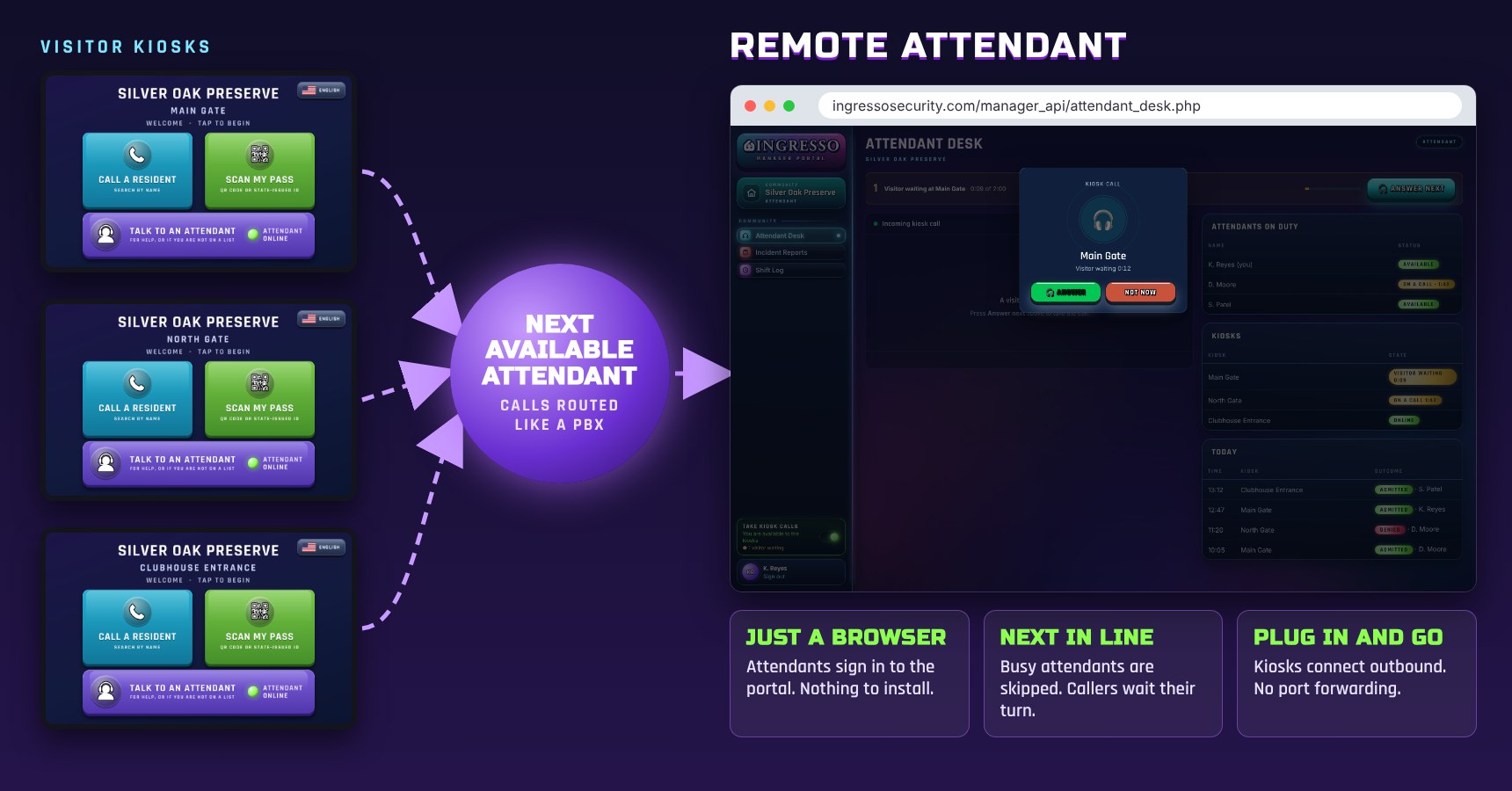
Visitor Kiosk calls routed to the next available attendant in a web browser

How It Works

From the Kiosk to Your Attendant in Seconds

1

The Visitor Taps

A visitor who is not on a list, or who needs help, taps Talk to an Attendant on the Visitor Kiosk.

2

The Call Is Routed

Every available attendant rings, in whatever portal page they have open. Busy attendants are skipped, and the visitor sees their place in line.

3

The Attendant Decides

The first to answer sees and hears the visitor, checks their ID, and admits or denies with one click.

Browser Check-In

Everything a Gatehouse Can Do, from Anywhere

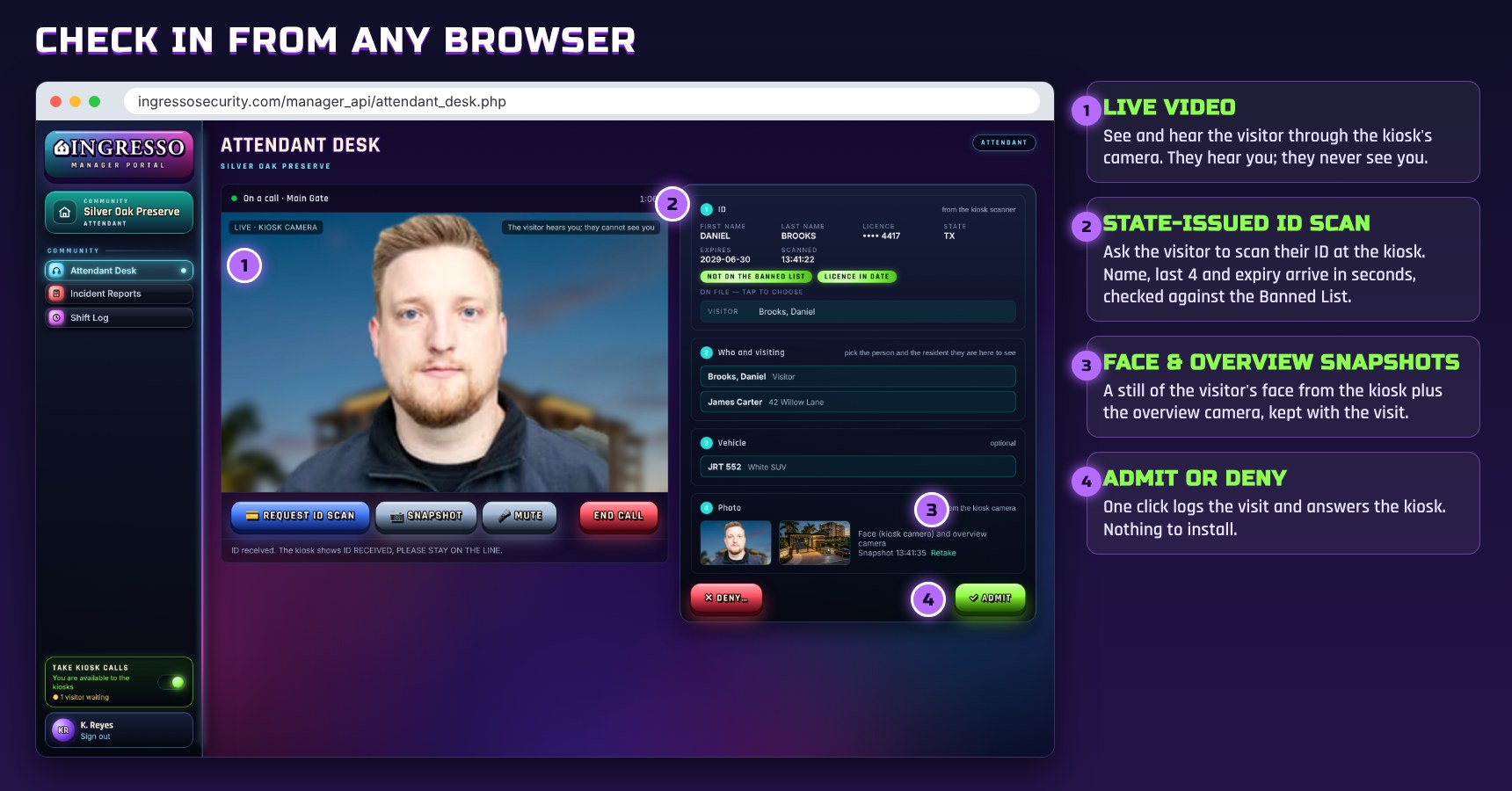
Attendant Desk in a web browser during a kiosk call, with live video, ID scan and snapshots

Live video from the kiosk

The attendant sees and hears the visitor through the kiosk's camera. The visitor hears the attendant but never sees them.

State-issued ID scan

One click asks the visitor to scan their ID at the kiosk. The name, last 4 digits and expiry arrive in seconds, already checked against the Banned List.

Face and overview snapshots

A still of the visitor's face from the kiosk camera and the overview camera, saved with the visit.

Who, where and which vehicle

Pick the visitor or vendor on file, or add a new one, then choose who they are visiting and the vehicle they arrived in.

Admit or deny

One click logs the visit and answers the kiosk. A denial shows a short message at the kiosk and never mentions the Banned List.

A record of every call

Every call, who answered it and the outcome are logged, and admitted visits carry their photos into the visitor log and the board report.

Quick and Easy

Nothing to Install. Nothing to Wire.

Just a browser

Attendants sign in to the Ingresso manager portal. Any office, any desk, any shift.

One switch to go on duty

Each attendant turns Take kiosk calls on or off. Kiosks show Attendant Online only while someone is available.

Rings on every page

A call pops up and rings on whatever portal page the attendant has open, so nobody has to sit on one screen.

Callers wait their turn

When every attendant is busy, visitors queue at the kiosk and see their place in line.

On or off per kiosk

Turn the attendant button on or off for each kiosk, from the kiosk or the manager portal.

No network changes

Kiosks and browsers both connect outbound. No port forwarding and no VPN, with an encrypted relay when a network is strict.

Applications

One Attendant. Every Entrance.

Gated Communities

After-Hours Gates

Cover the main gate when the gatehouse is closed, or run several gates from one office.

Condominiums

Off-Hours Front Desk

Keep the lobby answered overnight without a full-time desk.

Commercial

Lobby Reception

One receptionist covers lobbies across several buildings.

Industrial

Dispatch

Dispatch answers drivers at every truck gate without leaving the office.

Government

Guard Post

A central post answers visitors at public entrances across facilities.

What You Need

A Kiosk, a Browser and an Attendant

At the Entrance
KioskAn Ingresso Visitor Kiosk with Remote Attendant turned on
CameraThe kiosk's built-in camera; an optional overview camera for the second snapshot
ID scanThe kiosk's scanner reads state-issued IDs and QR passes
At the Attendant's Desk
SoftwareA current web browser. Nothing to install
AudioA microphone; a headset is recommended
AccountA manager portal login. Admins, managers, technicians and attendants can all take calls
Calls & Network
RoutingRings the available attendants; the first to answer takes the call
QueueCallers see their place in line, up to two minutes
NetworkOutbound only on both ends; encrypted relay when needed

See also: the Visitor Kiosk that places the calls, and the Attendant Station for staffed gatehouses.

See Remote Attendant in Action

Cover more entrances with the staff you already have.